Showing posts with label Adsense. Show all posts

Highest Paying Google Adsense Alternatives For Small Bloggers

By // No comments:

Hello bloggers. Have you just started a blog or did your Adsense account got banned? Then you may want to opt out for Adsense alternatives.

RevenueHits Review: The Best Adsense Alternative, Getting Started And Make Money

By // 5 comments:
For all the new bloggers out there, there is a crucial question for all of you. Are you blogging just to fulfill your passion or are you here to make some bucks as well? If you are here for this motive or are interested to make money from your blogs then there are ample opportunities for you. You can monetize your blog with Google Adsense, which is recognized as the best Cost Per Click ad network.
There are many bloggers who not only make money out of blogging just for making their living but also to pay for the extravagance as well. You can also make money out of blogging.
So is it really easy to make money out of your blog? This is the crucial question for all the newbies out there. Though blogging looks simple and easy process. Though it is very hard to sustain in the blogosphere and to make money out of it.
If you are already a blogger you may have known that Adsense is the ultimate money making goal of most of the bloggers.Adsense is recognized as the best CPC network of all times for various reasons. Read the following article to understand it better.

Though getting approved by and getting the Payout from the Adsense network is not an easy task though. Most of the bloggers fail to get approved for the first time. And most of the bloggers are not satisfied with the dollars they make out of it. I have seen many bloggers gave up their blogging career for these various reasons.
And I realized from my own experience that I couldn't make money for my cup of coffee with my adsense earnings, that is why I moved to RevenueHits.
There are many Adsense Alternatives if you don't have or don't want to go with Adsense. In this post we are going to explain one of the Adsense alternatives recommended by most of the bloggers and here is my review about this post.

About RevenueHits:

RevenueHits is a company found and operated by MyAdWise LTD, an Israeli based company. It was founded in 2008 designed to monetize online assets. Unlike Adsense it is CPA based advertising network. 
It doesn't matter what type of web site or blog you have and the traffic you are getting from. The ads are adjusted according to the region you are getting traffic from and the content of your blog. Moreover it is the performance based ad network.

How will I get Paid with RevenueHits?

The most important thing about RevenueHits is that it is CPA based ad network. Adsense pays you for the ad impressions and click on your Adsense ads put on your blog and web site but RevenueHits doesn't pay you for the ad clicks and impressions. 
CPA understands for Cost Per Action. It means you'll only be paid if your blog visitor click on your RevenueHits ads and does some specified action. The action can range from clicking on the link to downloading the browser extension. It also includes completing surveys, signing up for accounts, downloading apps or anything. You'll be paid for these actions based on your content and the traffic you are getting from. But frankly the earnings will fluctuate as per the fluctuation in the action of your visitors. And most of the bloggers on Forums say that you can make more that 50$ for the traffic of 100000 per day.

Payout Options:

You can payout your RevenueHits earnings from your Payoneer debit card, Paypal and Wire Transfer.
If you don't have a payoneer card get it here with 25$ bonus.

Minimum Payout:

The minimum payout is based on the payout options you choose. If you want to get your payment through Payoneer or Paypal the minimum payment is 20$ and if you want to get payment through Wire transfer the minimum payout is 50$.

Getting Started With RevenueHits:

Getting started with RevenueHits is the easiest way that any other ads network. You will just have to fill out the Form and put some JavaScript codes to you blog. Then you'll start getting impressions and some bucks as well.
You can get started with RevenueHits in just 5 minutes!
First Go to RevenueHits, Click On Publishers and Click on Sign Up To Become A Publisher button.
Provide Complete Information about your site and click on continue.
RevenueHits: Review The Best Adsense Alternative, Getting Started And Make Money
On the next page enter your Personal details and who you are referred by. You can put deardipen on the Referred By box.
RevenueHits: Review The Best Adsense Alternative, Getting Started And Make Money
On the nest step provide the Billing information. Choose your Payout option and payment threshold. 
Now you just have to put the ads to your blog or web site and start earning. It is as easy as that. You don't have to wait for the approval and activation. You can now log in to your dashboard.

How To Put RevenueHits To My Website?

RevenueHits has the simple and easy dashboard for the bloggers. Once you have logged in to your Dashboard Click on the "Placements" tab.
And Next click on New Placement Tab to put ads for desktop version or New Mobile Placement for mobile ads.
RevenueHits: Review The Best Adsense Alternative, Getting Started And Make Money
Now choose the ad format that you'd like to put in your blog. The placement will be created. 
RevenueHits: Review The Best Adsense Alternative, Getting Started And Make Money
Next click on </> to get the JavaScript codes to put it in your blog. You can also get a preview of the ads before putting it to your website.

Why I Recommend RevenueHits?

There are many reasons I recommend RevenueHits to you. I have discussed some of them below:

1. Free For Everyone:

Unlike other ad networks you don't need any approval to use this ad network as a publisher. They don't care if you are a newbie or a professional blogger. You can start using RevenueHits the day you start blogging. And you don't have to wait to implement the ads on your blog after you have got the account. You can get started to make money in just 5 minutes.

2. Low Payout Amount:

The payout amount is what the new bloggers care about. No newbie will want to wait to get his/her first payment. It has minimum payout of 20$ and you can get payment through Payoneer or Paypal.
If you don't have a payoneer account refer to the article below to get a free Payoneer debit card with 25$ bonus.
This is what everyone loves. Everyone will like to get the most out of their traffic. As RevenueHits is a CPA based network, there are more chances of action of your audience and more conversion of your traffic to money.

My Suggestion to choose Ad Format:

I have used this ad network in my blog and I can suggest you to choose the ad formats based on my experience. RevenueHits has Display or Media rich Ads, Pop Ups/Under , Text Ads, Interstitial Ads, Shadow Box etc. I have tried most of these ads and Interstitial, Shadow Box and footer slider ads were the ads which earned more rather than text or banner ads. Although I would recommend you to experiment with all the ad formats to know what works for you.
Hope this will help you get started with RevenueHits. Please feel free to contact us or comment below for any help. I would love to hear from you if this ad networking is working well for you!
Have a great day!

Increase Your Earnings Per Click For Adsense With SEMrush

By // No comments:
Blogging has been an easy way for most of the internet users to make money online. People work hard to create the best content for their blog and get an Adsense account. Though you get an Adsense account its not easy to earn as you expected. If you work hard with some smartness you can earn much from your blog.
The main way to earn more with Adsense is get more organic traffic. Organic traffic is the volume of site visits from search results. If you can drive more traffic from search results then you can make a handsome amount from Adsense. 
In this post we'll discuss how you can increase your CPC rates with this awesome tool SEMrush . This is a simple trick with which you can earn more than 50$ for just a click.
Increase Your Earnings Per Click For Adsense With SEMrush

Adsense PIN not received: Verify Adsense Without PIN

By // 1 comment:
Bloggers always want an Adsense account to earn online. Once you get an adsense account you can start earning. The only thing you have to do after getting an Adsense account is wait and seeing your ads earning dollars. But when you reach a threshold of 10$ you have to verify your address. They send a Pin code to your mailing address to verify your address and identity. This has been the nightmare to some bloggers from the country where the postal service is not good and fast. You get three chances to apply for the PIN to arrive to your address. If you don't enter the PIN, your account will stop showing the ads on your blogs and sites. And if you enter the wrong PIN your account may get suspended. But realizing the poor postal service of some countries, Adsense has made a provision to verify your adsense account with any government issued document that has your address on it. For this, apply for two PINs (make sure there is a duration of 4 weeks you apply for the next PIN) and if you don't receive the PIN apply for the third one. This time you don't have to wait for 4 weeks. You can immediately follow the following steps and get your account verified.

Get Adsense Approved Easily and Earn With WebAnswers

By // No comments:
As we all know Adsense is the king of the CPC ad network. If you are an internet enthusiast, earning online may be your one of your dreams. Getting an approved Adsense account can be one of the tough tasks for newbies. But this tutorial will help you to get an approved Adsense account. This tutorial will help you get adsense account with one of the Adsense partners; Webanswers.

How to Upgrade Hosted Adsense Account To Normal Account?

By // 2 comments:
Google Adsense is the king of CPM and CPC ad networks. The terms of Adsense are strict from always. Google is providing two types of account; Hosted Account and Regular account.

Read: Difference between hosted and non hosted Google Adsense Account

You can use hosted adsense account to show ads in your Google hosted sites. This is limited service to make money. But with the Regular Adsense account you can show ads to your own hosted domains as well. 

The hosted adsense account can be approved easily with Google Hosted partner sites like Youtube, Blogger, Hubpages etc.
It can easily be upgraded to normal account for showing ads in your own hosted domain and make money.
Following is a screenshot of hosted Adsense Account.
How to Upgrade Hosted Adsense Account To Normal Account?

Few things to Remember Before Upgrading your Hosted Account to Normal:

  1. You must have a top-level domain like .com, .net, .org
  2. You must be 18+.
  3. Add important pages in your blog like: About us,  Privacy Policy, Contact Us

Let's Get Started:

1. Sign in to your Adsense account. 
2. From the right corner of the page click onHow to Upgrade Hosted Adsense Account To Normal Account? button and click on Settings.
3. In “Access and authorization” section, Click on "Site Authorization".
4. On the "Show ads on other websites" page, enter the URL of the site where you want to show ads.
5. Finally click on Submit.
How to Upgrade Hosted Adsense Account To Normal Account?
After submitting this application for upgrading your Adsense account, you need to implement the ad code on the site you submitted above.

How to implement the ad codes?

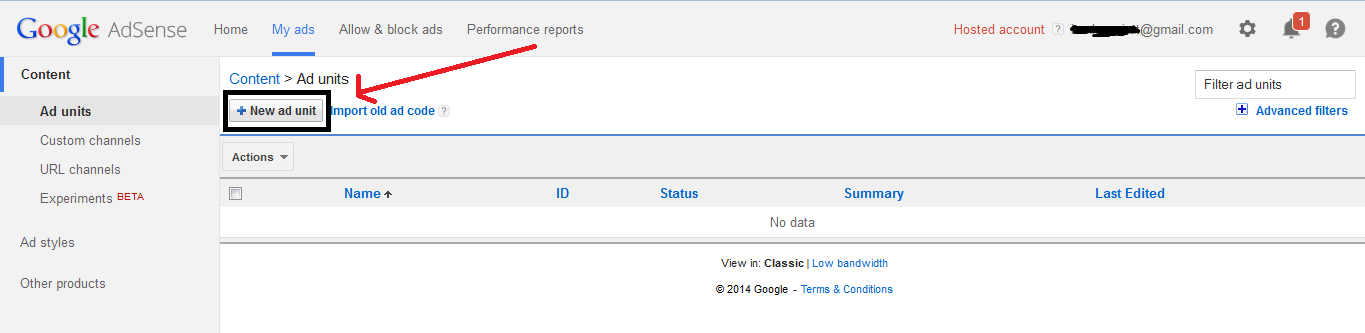
1. Click on My Ads tab from your Adsense account.
2. Click on New Ad Unit Tab. 
How to Upgrade Hosted Adsense Account To Normal Account? 2014
Now create an ad unit and click on Save and Get Code button and you will get the ad codes.
3. Now implement the ad codes in your site or blog.

You are done. Google will review your application which may take up to 7 days.
You'll get an email of approval or disapproval. Don't worry if you get disapproved, you can still use your hosted account.
Any questions, ask with us in comments.

Start Earning With your Blogger Blog With Adsense

By // 1 comment:
Blogger is as usual defined one of the best blogging platform. My last post A Complete Guide To Set Up a Blog With Blogger.com 2014  helped you to create a new blog with Blogger. Now in this post we will learn to make dollars with your blogger blog. For this you must register a blog with Blogger. So this way of earning with blogger blog is with Adsense.

How to Find High Paying Keyword for Adsense Using Semrush?

By // 1 comment:
Adsense is the undisputed king of CPC ads network. Using a simple trick you can maximize your earnings in Adsense, that is to use the top paying keywords for adsense. 
You may have seen many blogs sharing the Top Paying Keywords For Adsense, but they never share what is the source. Today i am going to share how i collected the Top Paying Keywords. 
How to Find High Paying Keyword for Adsense Using Semrush?

Best Paying Adsense Alternatives To Make Money

By // 9 comments:
It is worthless to explain that Adsense is the CPC king of the internet. If you are a new blogger, then Adsense can be the ultimate goal of most of the bloggers. But getting adsense approved with new blogs is not an easy task at all. If you have applied for the Adsense program and got rejected for several times or have been banned from the Adsense ad networks then this post if for you all. There are some networks below which you can use along with Adsense on your blog. So use these adsense alternatives on your blog to make the dollars out of your blog. So make sure that you have a blog and some decent traffic in your blog before getting started with any of the ad networks. If you don't have a blog or website, then get a free blog from Blogspot.
Also Read: RevenueHits Review: The Best CPA Adsense Alternative, Getting Started And Make Money 
Best Paying Adsense Alternatives


High Paying Technology Blog Keywords For Google Adsense

By // 2 comments:
You may have noticed that adsense has gradually decreases its CPC to less than 0.50$. Now almost all blogs and sites are being approved by Adsense. Rise in number of publisher means decrease in CPC and consequently decrease in earning.
And if you are a google ads publisher and definitely you like to earn more from your blog. You may have been getting more traffic and more clicks to your ads but still your earnings is too low. For this you have to take a wise step. 
The adsense ads are published as per the blog content.And your CPC is related to your keywords or on what content is your blog based on. Many bloggers have posted a lots of keywords on different niche. But I made a short tour and collected these keywords related to Technology and internet. These keywords are collected from among the most earning blogs or sites of the world.


How to avoid clicking on your own adsense ads?

By // No comments:
Adsense is the largest ads publishing platform in the world of internet. So, the policy of adsense are too strict. Once you break the policy of adsense as stated in their T&C you will no more remain the publisher of adsense as it will block you. The next bitter truth is once you are blocked you are blocked forever. You can't even publish ads in those sites where you have already implemented as with you former account that is blocked. Most users are blocked for clicking on their ads known or unknown. If you click on your own ads, I assure you you are blocked. Some click on their ads unknowingly, while clicking in some other links, being unknown about the consequences of their clicks. But google don't care about your reasons and block you. Hence we have thought of writing a post on it so that we can help many publishers from getting blocking .

Difference Between Hosted and Non Hosted Google Adsense Account.

By // 6 comments:
If you have known about the CPC ad networks, then you may also have heard of Google Adsense. Adsense is the ads platform by the giant Search engine network Google. Google Adsense allows the bloggers, YouTube geeks and other internet enthusiasts to make money from their online websites, applications, YouTube videos and other stuff on internet.
Google Adsense Provides two types of Accounts. They are Hosted And Non Hosted Adsense account.
So Let's have a look how hosted and non hosted account differ with each other.
Difference Between Hosted and Non Hosted Google Adsense Account.

What is Hosted Adsense Account?

Hosted adsense account is any account by Google Adsense that can be get by applying through the Adsense partner sites. Adsense is a company not solely owned by Google. It has some partner sites that shares the income of Adsense. So you can use these sites to get an Adsense account and use them in these sites to make money online. If you have an Adsense account, you can use this account just in the Adsense Partner sites. This adsense account can be easily obtained applying through these Partner sites. Check out the following posts to get a free and non hosted Adsense account.
The non hosted adsense account can be upgraded to Hosted Adsense account though a simple step. You need to have a custom domained blog for this. You can get a free domain name through the following free domain registrars.

Learn how to upgrade to Non hosted Adsense account from the following post.

What is Non Hosted Adsense Account?

Unlike Hosted Adsense account, Non hosted Adsense account can be used in any of your sites. It means Non hosted adsense account is not confined just to the Adsense partnered sites. You can use this account in any of your domains, blogs, websites or any where you want to monetize. You can either get this by applying for Adsense through your self hosted blog or by upgrading your hosted adsense to non hosted. This is the way you can monetize more platforms to make more money from internet.

Copyright

DMCA.com
MyFreeCopyright.com Registered & Protected